Automated Buffering and Intersection Analysis in GIS
ArcPy application - Course Work - Lakehead University (2023)
Introduction
Introduction  This StoryMap showcases the Python/ArcPy script developed for NRMT 3350/5132 as part of Assignment 2. The assignment focused on automating the processing of spatial data within a geodatabase using Python and ArcPy. The goal was to read buffer values from a text file, apply these values to create buffer zones around a feature class, and perform intersection analysis with other feature classes.
Objective
The script is designed to:
- Read Buffer Values: Extract buffer distances from a text file and handle errors if the file is missing.
- Clean and Format Data: Process buffer values to ensure they are valid, unique integers.
- Apply Buffers: Use the cleaned buffer values to create multiple buffered feature classes.
- Intersect with Feature Classes: Perform intersection analysis on specific feature classes and save the result
Location
The study area is located in the Provincial Forest of Ontario, approximately 40 kilometers north of Thunder Bay, at coordinates 48°38’53.2”N, 89°22’29.7”W.
Workflow
1. Reading Buffer Values
The script begins by specifying the path to the buffer_values.txt file and attempts to open it. If the file is missing, an error is raised and the script exits gracefully. The file contains a mix of float, integer, and string data. The goal is to extract and process only the numerical values (both integers and floats) to use as buffer distances
The script performs the following steps:
- Extract Numerical Values: The script reads the file and filters out non-numeric entries
- Round Floats: Float values are rounded to the nearest integer
- Remove Duplicates: Duplicate numbers are removed to ensure each buffer distance is unique
1
2
3
4
5
6
7
8
9
10
11
12
13
14
15
16
17
18
19
20
21
22
23
24
25
26
27
28
29
30
31
32
33
34
35
36
37

#Erlang Dzarkhan Syah
#1244440
#November 22, 2023
# Assigment 2 is mostly about intro to arcpy in general, how we can import and store data as an output, modify file, and run geoprocessing as a vector processing in python

#import module
import arcpy
import sys

#path to the buffer file
buffer_file = r"C:\Users\Erlang\Downloads\buffer_values.txt"

#try and except act like a boolean, if argument in "try is true, it will return true and do the process"
try :
    def buffer_selection (buffer_file): #define the argument that we will be using in buffer using def
        file_open = open (buffer_file, "r") #open buffer file
        file_split = file_open.read().split(",") #to split values by comma
        new_buffer = set() #empty set, used to store new value of the buffer that has been sorted

        for value in file_split: #for each value that has been split up by comma
            #check if the value is number
            number = value.strip() #make sure to remove any leading or trailing whitespace characters if any if we probably use another data
            try:
                round_value = round(float(number)) #round the number
                new_buffer.add(int(round_value)) #convert to int and add to set

            #check if the value is non number
            except ValueError:
                print(f"Skipping non-numeric value: {value}")

        return sorted(set(new_buffer)) #sorting the value from the lowest to the highest and remove duplicate values

#check if the file exist in that path, if not it will terminated automatically
except FileNotFoundError:
    print ("buffer_values.txt file does not exist in the specified location.")
    sys.exit("Script terminated due to missing buffer_values.txt file") #this sys function will close and terminate the file
2. Buffer Processing
With the cleaned buffer values, the script proceeds to create buffer zones around the roads feature class. Each unique buffer distance results in a separate feature class:
- Buffer Creation: For each buffer distance, a new buffer zone is generated around the roads feature class
- Feature Class Naming: Each newly created buffer zone is saved as a feature class with a name that includes the buffer distance. For example, a buffer distance of 100 meters will produce a feature class named roads_100buff
- Output: These feature classes are stored in the geodatabase and are used for subsequent spatial analysis
1
2
3
4
5
6
7
8
9
10
11
#GEOPROCESSING
geodatabase = r"C:\Users\Erlang\OneDrive\Documents\ArcGIS\Projects\Assignment 2\jhf.gdb" #path for geodatabase file
arcpy.env.workspace = geodatabase #set geodatabase as the environment
distance_values = buffer_selection(buffer_file) #values that will be used for geoprocessing
print (f"distance values that will be used are {distance_values}")

#BUFFER
for distance in distance_values: #for looping all the distance values
    buffer_distance_str = str(distance) #the distance should be in string
    buffer_output_name = f"roads_{buffer_distance_str}buff" # Create buffer output name
    arcpy.analysis.Buffer("roads", buffer_output_name, f"{distance} Meters")  # Buffer the roads feature class with the current buffer distance
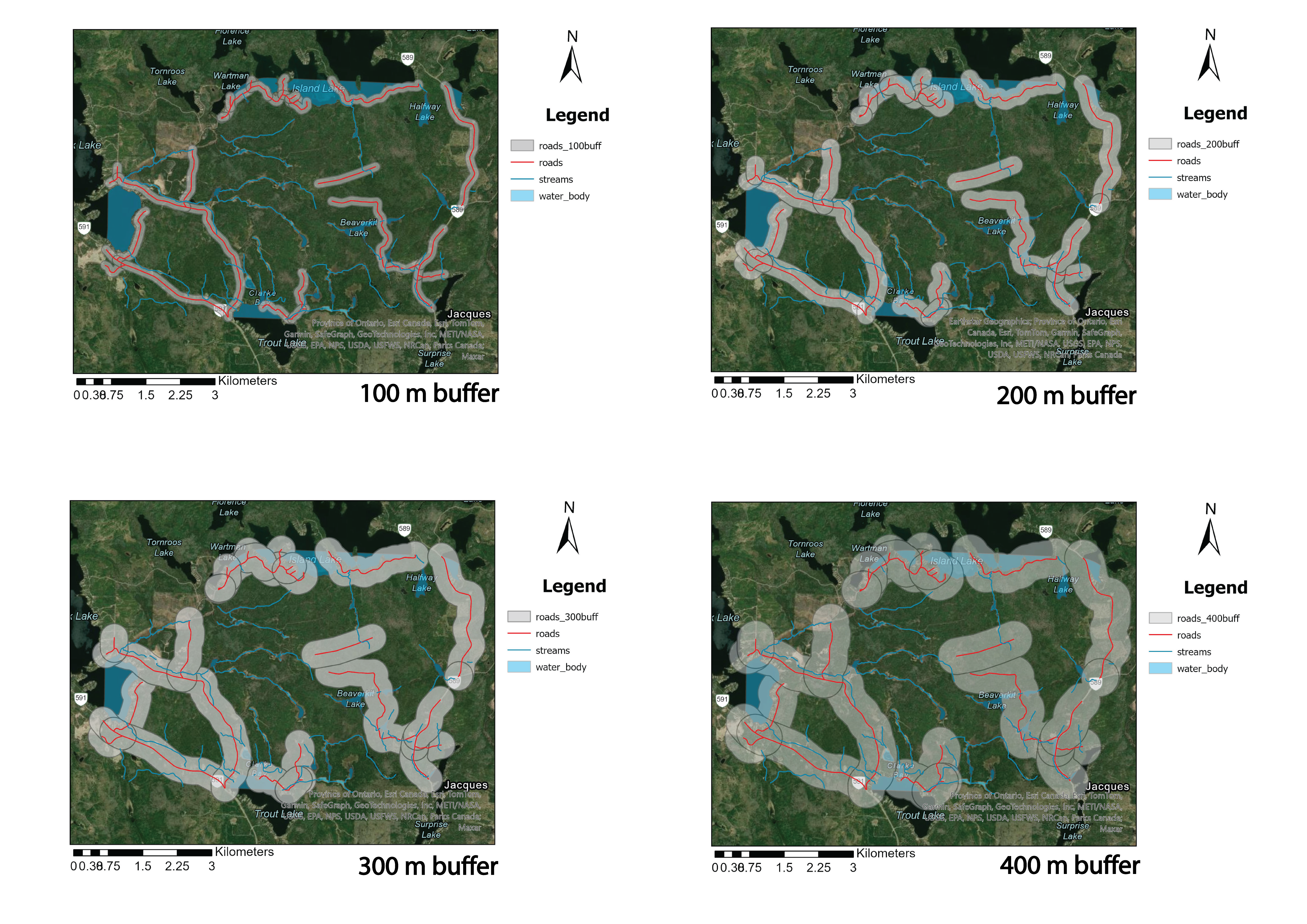 Extracted buffer distance analysis, from left to right : (100 m buffer, 200 m buffer, 300 m buffer, 400 m buffer)
3. Intersecting Feature Classes
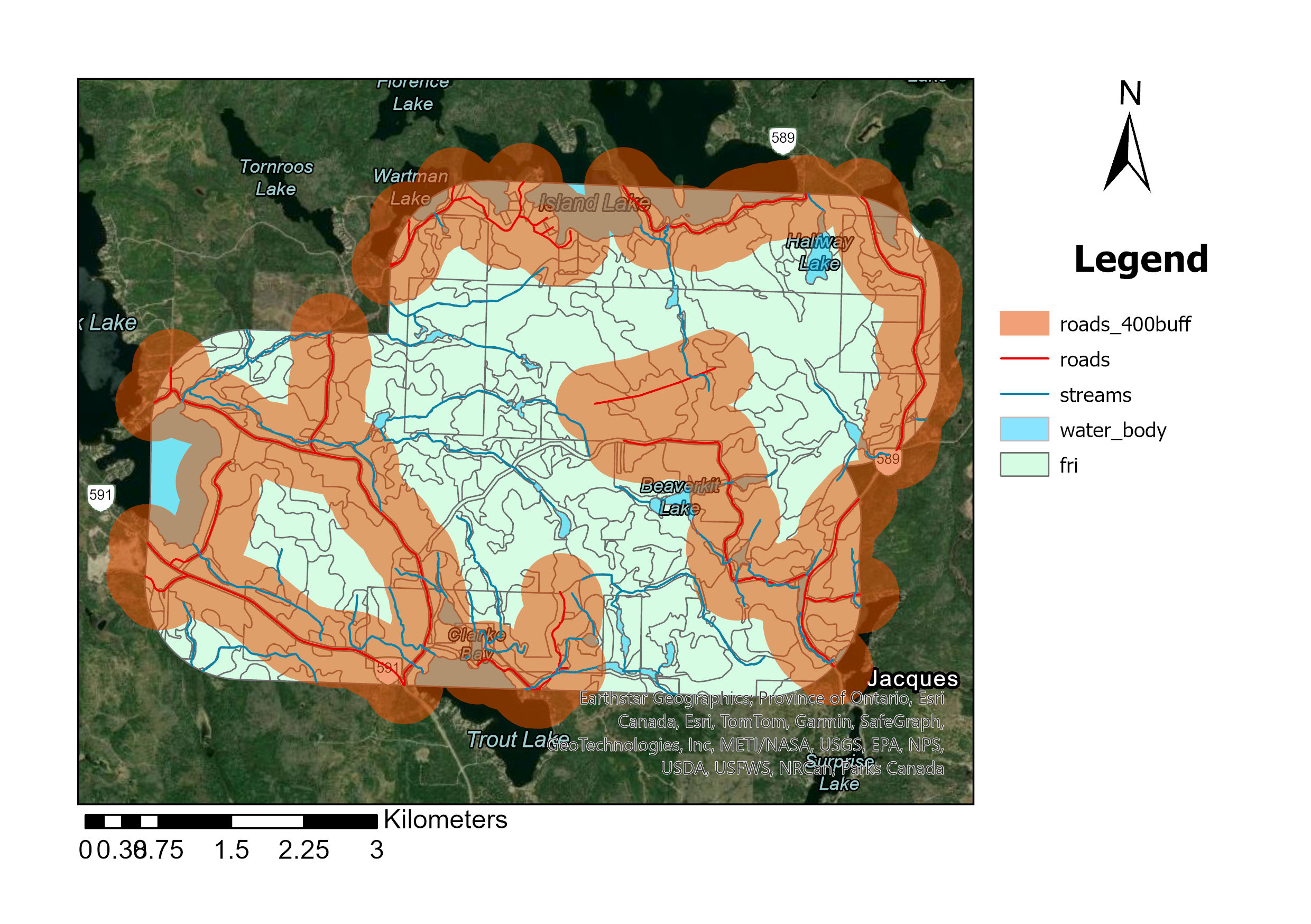
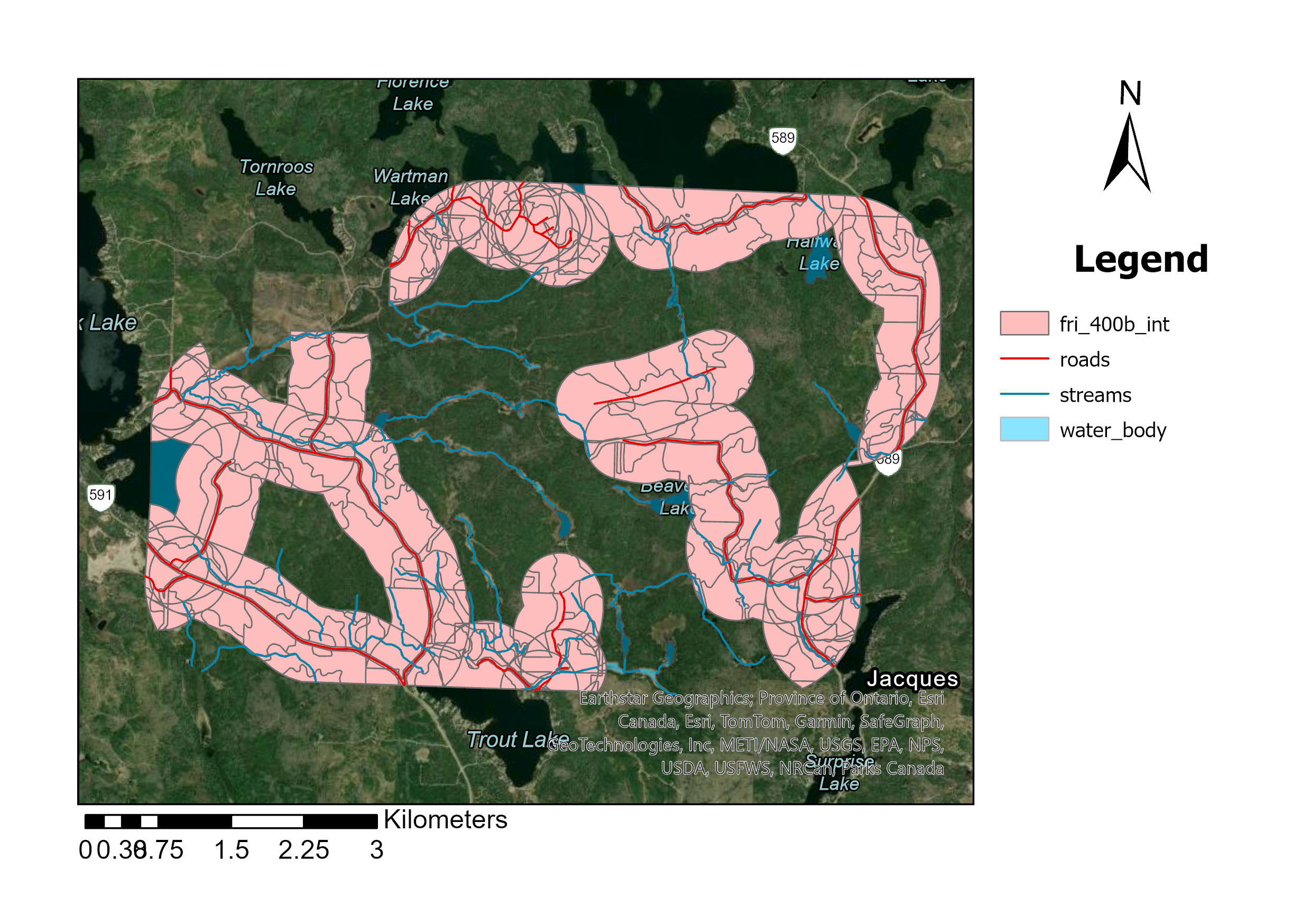
The script systematically intersects feature classes within the geodatabase, focusing on those with “fri” in their names. This is done with the buffered feature classes created earlier. Here’s how the process works:
- Feature Class Selection: The script identifies and processes all feature classes in the geodatabase whose names contain “fri”
- Intersection Operation: Each of these “fri” feature classes is intersected with the previously created buffered feature classes. This operation spatially combines the features to analyze their overlapping areas
- Result Naming: The results of these intersections are saved using a consistent naming convention, such as fri_100b_int, where the number represents the buffer distance
1
2
3
4
5
6
7
8
#INTERSECT
feature_classes = arcpy.ListFeatureClasses() # to retrieve the feature class
for fc in feature_classes: #looping for feature class
    if 'fri' in fc: #looking for fri in feature class
        for distance in distance_values: #looping for all number used for buffer
            buffer_distance_str = str(distance) #defining distance in string
            intersect_output = f"fri_{buffer_distance_str}b_int" #make an output name for intersect file
            arcpy.analysis.Intersect([fc, buffer_output_name], intersect_output) #intersect between fri and buffer roads
Conclusion
The provided script effectively demonstrates key functionalities of ArcPy for spatial data processing within a geodatabase environment. It covers importing and storing data, manipulating files, and executing geoprocessing operations, with a primary focus on vector processing using Python. Overall, the assignment serves as an introduction to working with geospatial data in ArcPy and showcases its potential applications in areas such as environmental management, urban planning, and geospatial data management